Introducing tscmd — The TagSpaces Command Line Tool

Tag, Describe, Index — All From Your Terminal
TagSpaces Desktop and Web are great for visual file organization. But when you need to tag 500 invoices, generate thumbnails for a NAS folder on a schedule, or let an AI agent sort your downloads — a GUI gets in the way.
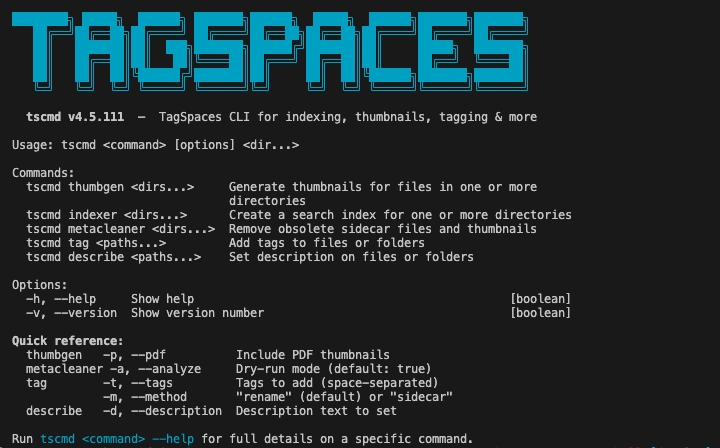
Meet tscmd: a fully rewritten command-line tool that brings TagSpaces' core capabilities to the terminal. Five commands, non-interactive, idempotent, composable with standard Unix tools.
What It Does
npm install -g @tagspaces/shell
One install, five commands:
tscmd tag— add tags to files and folders (via filename or sidecar)tscmd describe— set descriptions from inline text, a file, or stdintscmd indexer— generate a full-text search index for a folder treetscmd thumbgen— recursively create thumbnails (including PDFs)tscmd metacleaner— find and remove orphaned sidecar files (dry-run by default)
A quick taste:
tscmd tag /photos/beach.jpg -t vacation portugal 2026
tscmd describe /projects/webapp -d "React frontend for the customer portal"
tscmd indexer /nas/shared-drive/
All metadata lands in .ts/ subdirectories as plain JSON — the same format TagSpaces Desktop and Web already read. No database, no daemon, no lock-in.
For full syntax, options, and setup instructions, see the tscmd documentation.
Built for AI Agents
This is where tscmd gets interesting. Its non-interactive, stdin-friendly design makes it a natural tool for LLM-based agents that need to organize files programmatically.
Picture an agent processing incoming documents:
# Tag based on content analysis
tscmd tag /inbox/contract-acme.pdf -t contract client-acme 2026 legal

# Pipe an AI-generated summary as the file description
# Extract text, then summarize, then describe
pdftotext doc.pdf - | ollama run llama3 "Summarize the following text in one paragraph" \
  | tscmd describe doc.pdf -d -

# Prepare the folder for browsing in TagSpaces
tscmd thumbgen /inbox/
tscmd indexer /inbox/
The result: a fully organized, searchable, thumbnail-rich folder — created without any human interaction, browsable in TagSpaces the moment you open it.
Why agents love tscmd:
- No prompts, no confirmations, no interactive menus
- Idempotent — safe to retry on failure
- Stdin support — pipe generated text straight into descriptions
- Batch-friendly — multiple paths per command
- JSON metadata — machine-readable by design
Whether you are building an MCP tool server, a LangChain pipeline, or a cron-triggered bash script, tscmd gives your agent the ability to organize actual files on disk — not rows in a database, but real files that persist independently of any application.
Composable by Nature
tscmd works the way Unix tools should — combine it with find, loops, or parallel:
# Tag all PDFs in an archive
find /archive -name "*.pdf" -exec tscmd tag {} -t document archived \;

# Apply a template description to every project folder
for dir in /projects/*/; do
  tscmd describe "$dir" -f /templates/project-readme.md
done
More examples and advanced patterns are in the documentation.
Get Started
npm install -g @tagspaces/shell
tscmd tag ~/Desktop/test.txt -t hello world
Open the folder in TagSpaces — the tags appear immediately.
The source code is on GitHub, released under the MIT license — free to use, modify, and integrate into your own tools and workflows. We are actively exploring deeper integration with AI agent frameworks, including an MCP tool server that exposes tscmd as callable tools for Claude, GPT, and other agents. If you are building agent workflows that touch the file system, we would love to hear from you — reach out on GitHub or the community forum.